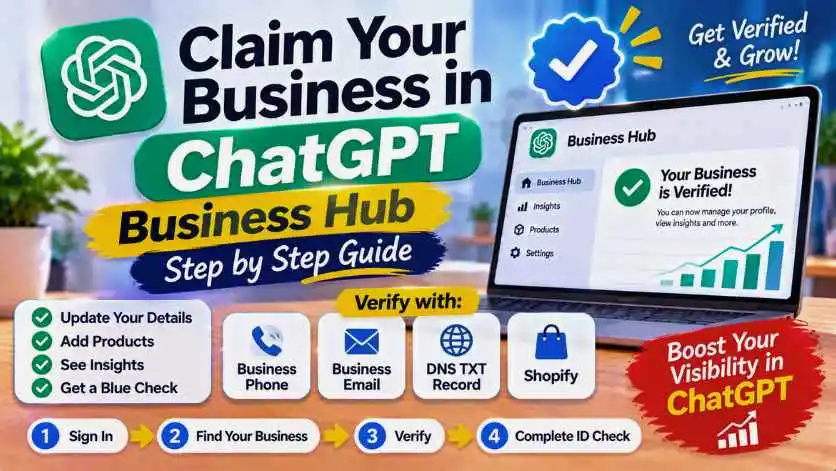
To claim your business in ChatGPT, sign in to ChatGPT, open Business Hub from the sidebar (or go to chatgpt.com/business-hub), search for your business, then verify it by business phone, business email, a DNS TXT record on your domain, or Shopify. After OpenAI approves the claim, you complete an ID check with Persona to edit your profile and see how often ChatGPT mentions you. OpenAI launched it in beta on November 10, 2026. Online businesses can claim it wherever ChatGPT is available, but local shops and restaurants can only claim an existing US listing for now. Details below come from OpenAI's help center, checked on November 12, 2026.
The short answer
- Cost: OpenAI publishes no fee. You don't need an Ads account or ChatGPT Enterprise
- Who: the owner, or someone authorized to represent the business
- Online business outside the US: yes, if ChatGPT is available in your country and verification works there
- Local shop or restaurant outside the US: not yet (only existing US listings)
- Business Agents (a chatbot for your business inside ChatGPT): US ecommerce and online services only
- Easiest method for a website owner: verify with a DNS TXT record on your domain
What Is ChatGPT Business Hub?
Business Hub is OpenAI's new dashboard for businesses, part of the Businesses in ChatGPT beta. Think of it as Google Business Profile plus Search Console, but for ChatGPT. Once your business is verified, you can:
- Correct your details: website, description, category, logo, cover photo, delivery and return policy
- Add products: connect a product feed with prices and availability (CSV, hosted URL or Shopify)
- See insights for the last 28 days: mentions, website clicks and discovery topics
- Get a blue check: the verified badge appears after your Persona ID check is approved
For an online business, a mention counts only when ChatGPT references your website. Your brand name alone doesn't count. That's why a clear website and profile matter.
Who Can Claim a Business?
| Your business | Can you claim it now? |
|---|---|
| Online business with a website, outside the US | Yes, where ChatGPT is available and verification is supported |
| Online business in the US | Yes |
| Local shop or restaurant in the US | Only an existing listing |
| Local shop or restaurant outside the US | Not yet |
| Shopify store | Yes, connect from Business Hub or Shopify admin |
| Business Agent (chatbot) | US ecommerce and online services only |
OpenAI doesn't publish a country list for Business Hub. Its rule is that claiming works where ChatGPT is available and the required verification is supported, and that availability depends on your business's location and type. The fastest way to know is to try: it only takes a few minutes.
Before You Start: What You Need
Have these ready
- A ChatGPT account (a free one works) that will manage the business. Use your business email if you can
- Access to one verification method: business phone, business email, your domain's DNS settings, or Shopify
- A government-issued ID for the Persona check
- Possibly your business registration information and proof you can represent the business
- Your logo, a cover photo, and a short business description (see the prompt below)
How to Claim Your Business in ChatGPT
- Sign in to ChatGPT and open Business Hub from the sidebar, or go to chatgpt.com/business-hub
- Search for your business by name and select the matching listing. If you run an online business and it isn't listed, you may see an option to add it
- Confirm the ChatGPT account that will manage the business
- Choose a verification method and follow the prompts (details below)
- Wait for OpenAI's review. You get the decision, or a request for more information, by email
- Complete the Persona ID check (Verify with Persona > Continue to Persona). You need it to publish changes, see insights and get the blue check
Got an invitation email from OpenAI? Open its personal link and sign in with the email address that received it. See "Contact support"? Your listing is locked: select Contact support to ask for access. Already claimed by someone else? Open the profile, select the ••• menu, then Dispute ownership.
The 4 Verification Methods
| Method | How it works | Best for |
|---|---|---|
| Business phone | Code by SMS or automated call to the business number | Businesses with a listed phone |
| Business email | Code sent to the email linked to the business | Email on your own domain |
| Website domain (DNS) | Add a TXT record to your domain, then click Verify domain | Bloggers, freelancers, online businesses |
| Shopify store | Log in to your Shopify store and approve access | Shopify merchants |
Verify Your Domain on Hostinger (DNS TXT Record)
If your website is on Hostinger, here is the DNS method step by step. Other hosts work the same way, only the menu names change.
- In ChatGPT, select Website domain and copy the TXT record it shows: the type, the name (host) and the value
- In your Hostinger dashboard, go to Domains, select your domain and open DNS / Nameservers (or open your website, then Advanced > DNS Zone Editor)
- In Manage DNS records, choose TXT as the type
- In Name, enter exactly what ChatGPT shows. If it shows your main domain, use @
- In Value, paste the value from ChatGPT. Leave TTL as it is, then click Add Record
- Go back to ChatGPT and click Verify domain. If it fails, wait and try again later: DNS changes can take up to 24 hours
Don't delete your other TXT records. Hostinger adds an SPF record (v=spf1) for email by default. Just add the new one next to it. Also, the Hostinger DNS editor only works if your domain uses Hostinger's nameservers. If your DNS is somewhere else (like Cloudflare), add the record there.
What to Write in Your Profile
After approval, open your profile in Business and fill in the website, description, category, logo, policies and cover photo. OpenAI reviews every change before it goes live, and ChatGPT may still use other sources about you. So keep it factual, simple and the same as your website.
Use this prompt in ChatGPT to draft your description:
Write a factual business description for my ChatGPT Business Hub profile, max 80 words. No hype words like "best" or "leading". Say: what we do, for whom, where we work (online / country), our main services or products, and one thing that makes us different. Use the same words as my website. Here is my website's About page: [paste text]Tip: check the facts ChatGPT has about you before you claim. Ask ChatGPT "What is [your business]? What does it offer?" and note every mistake. Those are the things to fix in your profile and on your website.
Reading Your Insights
Open your business in Business Hub and select Insights. You see the last 28 days:
| Insight | What it means |
|---|---|
| Mentions | How often ChatGPT referenced your website in answers (online businesses) |
| Website clicks | How often people clicked from ChatGPT to your site |
| Discovery topics | Common themes in answers that mentioned or cited you (not individual prompts) |
Businesses never see people's prompts or conversations. Insights also only appear once there's enough activity, so a new or small site may see little at first.
Problems People Report
This is a beta, so expect some rough edges:
- Your shop or restaurant ends on a waitlist: outside the US, physical locations can't claim yet. Online businesses can
- Persona asks for a VAT number as a sole proprietor: some users report this on the OpenAI community forum. If you're blocked, use Contact support
- Domain won't verify: check you added the record at the provider that really manages your DNS (your nameservers), and wait a few hours
- Changes don't show in ChatGPT: OpenAI reviews them first, and answers can take time to update
Frequently Asked Questions
How do I claim my business in ChatGPT?
Sign in to ChatGPT, open Business Hub from the sidebar or go to chatgpt.com/business-hub, search for your business and verify it by business phone, business email, a DNS TXT record or Shopify. After approval, complete the Persona ID check.
Is ChatGPT Business Hub free?
OpenAI publishes no fee for claiming a business. You don't need an Ads account or a ChatGPT Enterprise agreement, and a regular ChatGPT account can manage the business.
Can I claim my business in ChatGPT outside the US?
Online businesses can claim where ChatGPT is available and the verification is supported. Local shops and restaurants can currently claim only an existing US listing, and Business Agents are US-only.
How do I verify my domain for ChatGPT Business Hub?
Select Website domain, copy the TXT record ChatGPT shows, add it to your domain's DNS settings exactly as shown, then return to ChatGPT and select Verify domain. DNS changes can take time to appear.
How do I get the blue check in ChatGPT?
Claiming alone doesn't give the badge. The blue check appears after OpenAI approves your Persona identity verification.
What does a mention mean in Business Hub insights?
For an online business, a mention counts when ChatGPT references the business's website. The brand name alone doesn't count. Insights cover the past 28 days.
Can I see what people ask ChatGPT about my business?
No. Businesses see aggregated insights such as mentions, website clicks and discovery topics, but never individual prompts or conversations.